2. Digital Design
The class I am talking about is digital design. In this class we will be basically creating a lot of different things. This includes websites, templates, slideshows, etc. We will be using websites like these and add more information as the year goes on.
1st project. This project was about making a personal room. I chose each of the items below to make it about me. Click this link to access a PDF of a google sheets which explains each of the items in the photo to the right.

For our second project we created personal logos. I chose what font, font size, and style. We had to create a full logo which displays my first and last name and we had to create an abbreviated logo which displays my enitials. Shown to the right is the Jpeg and PNG version of full and abbreviated logos.
Jpeg

PNG


Our third project was to create a pop out animal and a pop out person by using perspective to create a 3D image. For my pop out animal I chose a dolphin because dolphins are my favorite animal. For my pop out person I chose Josh Jacobs because he is my favorite football player. Both of these projects are shown to the right.


For our forth project of the school year we created the star in a movie poster. In project we had to pick a movie and had to put my face on the star of the movies face. We also had to blend my face in with the rest of the poster and adjust the lighting. For my project I chose Home Alone because I like Christmas movies.This movie poster is shown below.

For our 5th project we had to create a TV or Movie combo. We basically had to combine two movies into one by finding a word they have in common. We had to blend them together so and adjust the lighting so that it would look nice. For my project I chose The Nightmare Before Christmas and Christmas Chronicles. I chose these two movies because I was making this project in between Halloween and Christmas.This project is shown to the right.

These are all of the projects that I created in Marking Period 1. In Marking Period 2 we created mostly movie poster projects.
Start Of Marking Period 2
For our first project in marking period 2 we had to create a movie poster. The prompt for this was to make a movie poster featuring Arnold Schwarzenegger and Ariana Grande who are pirates an have to work together to defeat a group of aliens. In the picture shown their is two scenes the first is the pirates sailing from an island and the second is aliens attacking the pirate ship.This picture is shown to the right.

For our next project we had to use a movie poster and change one letter. After we changed this letter we had to make changes to the movie poster. For mine I did Paws and replaced the shark with a dog. This picture is shown to the right.

For our next project we had to create a movie poster with our own creative ideas. For mine I featured the actors Dwayne Johnson and Adam Sandler as the coaches of the Green Bay Packers. This game was a thriller between 2 teams for the NFC North where the underdog Packers came out on top.

For our last project of 2025 we had to make a holiday card. For this project we had to put images together to make a card. For mine I made a Christmas Card that I am going to send to a friend.

Our last project in Marking Period 2 was to create a movie poster that promotes Digital Design to incoming freshman next year. We had to take a few of our favorite projects throughout the year so far and make it visually appealing. We had to include all of the tools that we have used at this point in the year and tools that we will use in the future.

So far in Digital Design I have had a lot of fun designing each poster or project and I can't wait for every new project that we get. I am excited for what Marking Period 3 and Marking Period 4 holds with projects and creativity.
Marking Period 3
For this project we were at home and had virtual school. This project was to create a collage of 20 pictures that answered specific prompts. These include experiences, place that you want to travel to in the future and even my current view as I sit on a screen all day.

For this project we had to take a picture from a window in our house and use other pictures to make it look like a destination. For my project since there was snow on the ground I put a mountain and slalom sticks.

For our next project we had to recreate the Buc Logo through an app called illustrator. Illustrator is an app on the computer that makes lines smooth. My Buc Logo is shown directly to the right.
For this project we had to take our Buc Logo and recreate it. We could change anything on the logo. My design is shown directly to the right.

Our next project was to put ourselves into illustrator and create ourselves as a cartoon. Illustrator allows us to create ourselves as cartoons by making smooth lines.My self cartoon is shown to the right.

Our last project of the marking period was to put the head of our self cartoon onto the body of another cartoon character. For my project I chose Charlie Brown as my cartoon character which is shown below.

Marking Period 4
Our first project of marking period 4 was to create our own personal fonts. This project required lots of creativity. This font is featured in this paragraph and the PDF directly to the right.

Our next project was to incorporate my self cartoon with our font.For mine I decided to put my logo inside the G to give it the best look.
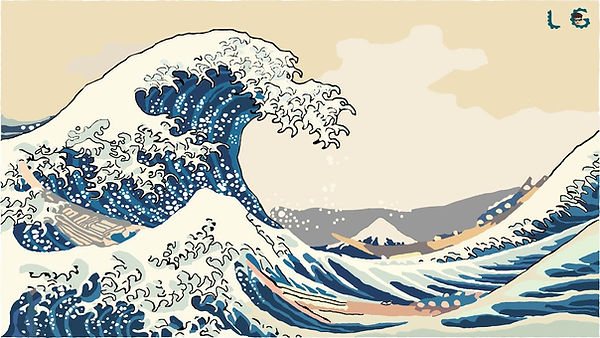
Our last project was to take a famous piece of artwork and put it into Illustrator so that it is smoother. For mine I decided to put my to take the famous Japanese wave painting.
All of the work that we did all year was really fun and I'm going to miss this class next year.